Getting Started
How to Run Your First Website Audit
A step-by-step walkthrough for running your first audit with CheckSitePulse, from adding your site to reviewing your first report.
If you've never run an automated website audit before, it can feel like a lot to take in — crawlers, categories, severity levels. In practice, getting your first useful report takes about five minutes. Here's exactly what to expect.
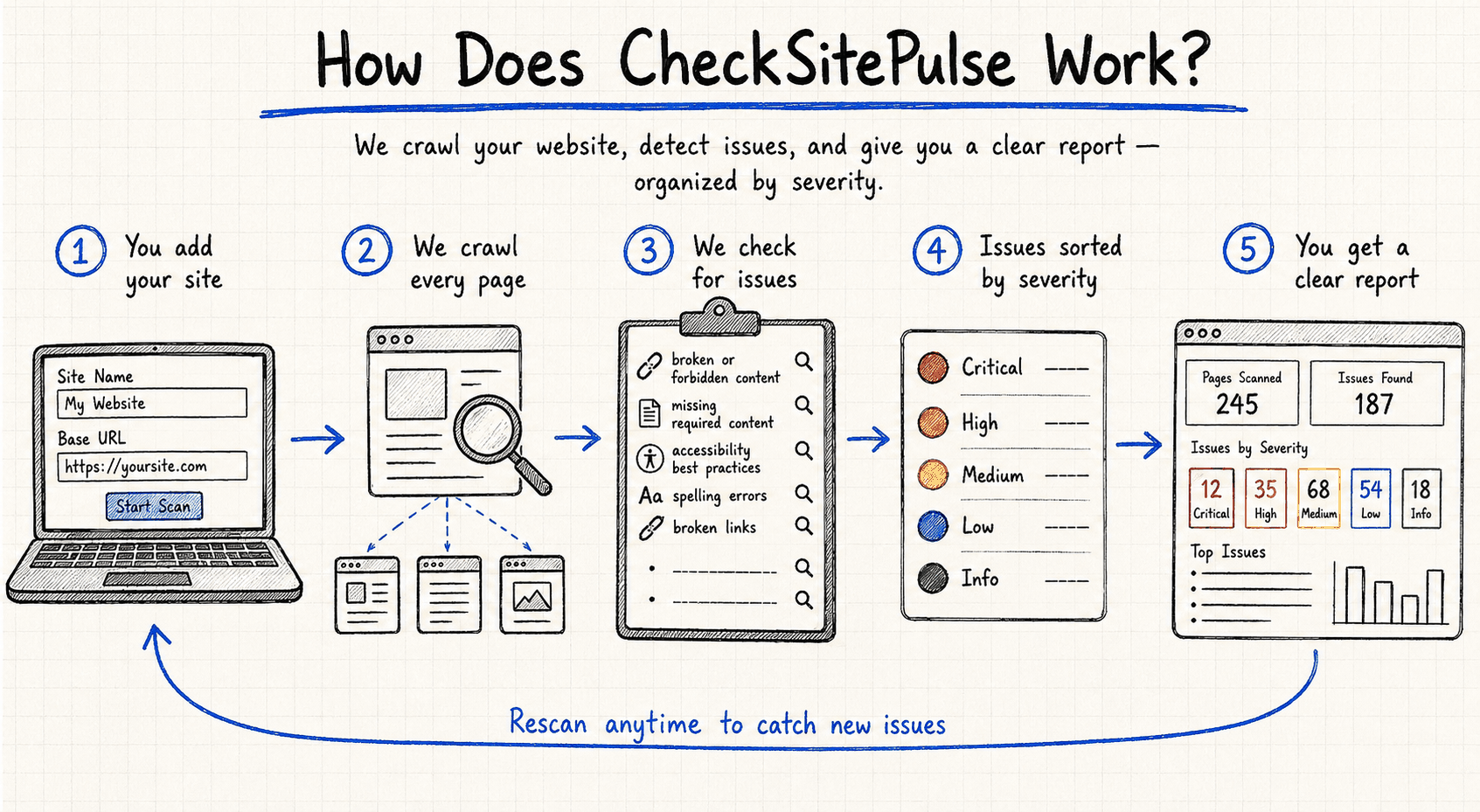
Step 1: Add your website
Start by entering your website's root URL — for example, https://yourcompany.com. CheckSitePulse uses this as the seed for its crawler, the starting point from which it discovers every other page on your site by following internal links.
A couple of things worth getting right at this stage:
- Use the canonical version of your domain (with or without
www, whichever your site actually redirects to). - Make sure the URL is publicly reachable — sites still behind a login wall, staging password, or firewall can't be crawled from the outside.
Step 2: Run the audit
Once your site is added, starting an audit is a single click. Behind the scenes, CheckSitePulse crawls your site page by page, respecting your robots.txt rules and a reasonable crawl delay so it doesn't overwhelm your server. Each page gets analyzed across seven categories: site integrity, content quality, content policy, accessibility, security, performance, and SEO.
For a small site (under 50 pages), this usually finishes in a few minutes. Larger sites take longer — you can leave the audit running in the background and come back to it; there's no need to keep the tab open.
Step 3: Review your results
Once the audit completes, you'll land on the report view. Rather than a raw list of every issue found, results are organized by severity — critical issues that need immediate attention float to the top, while minor stylistic notes sit lower down. Each finding links directly to the affected page, so you're never stuck cross-referencing a report against your site manually.
A good first pass looks like this:
- Skim the critical and high-severity issues first — these are usually things like broken links, missing security headers, or accessibility failures that affect real users.
- Group findings by category if you're delegating work — accessibility fixes might go to your frontend developer, while security headers might be an infrastructure task.
- Don't try to fix everything in one sitting. Most sites accumulate issues over months or years; it's normal for a first audit to surface more than you'll tackle in a single afternoon.
What happens next
CheckSitePulse doesn't just give you a one-time snapshot — the real value comes from running audits regularly and tracking whether issues get resolved or reintroduced over time. Once you're comfortable with your first report, it's worth exploring Understanding Your Audit Results to get more out of each category, or setting up a recurring audit schedule so new problems get caught early rather than accumulating unnoticed.
If anything in your first report looks unclear or unexpected, that's normal — website audits surface a wide range of technical detail, and it takes a little time to build intuition for what's worth prioritizing. Start with the critical issues, work outward from there, and you'll have a healthier site within a few passes.
Ready to see these issues on your own site?
Run a free audit with CheckSitePulse and get a full report in minutes.
Request Beta Access